Wednesday, December 17, 2008

Reading :: Organizing Modernity (second reading)

Organizing Modernity: Social Ordering and Social Theory
By John Law


I reviewed this book a while back, and was not kind. But reading Law's After Method made me decide to reread the book, especially after running across a reference to the project management aspects of Law's case. So I took another crack at it. The second read was more positive. I still wouldn't place this book high on a reading list -- it's still my least favorite of Law's books -- but it does have some virtues.

The book is a study of order and ordering at the Daresbury Laboratory. But -- and this fact is what yielded my previous review of the book -- it is just as much an introspection of the role and limits of the ethnographer in such a study, as the ethnographer is involved in his or her own ordering project. Law's angst throughout the project is due to becoming acutely aware that his own ordering practices -- what data he collects, what he chooses to analyze and write, how he presents the results -- are as artificial and partial as those he observes at the site. This realization is often crippling, and Law writes of having to retreat from the site to his car to have lunch, of worrying that the real action was always happening elsewhere, of fearing the power and status of his participants. (Really, it's a very fearful book, and intentionally revealing in its fear.)

Law argues that "perhaps there is ordering, but there is certainly no order" (p.1). So, he wonders, what material conditions enact this ordering? What are the social technologies of control? If we accept that there is no root order (p.2), and that the social is materially heterogeneous (p.2), how do we understand ordering? To find out, he embarks on an organizational ethnography of a world-class science lab (p.3), and he examines his own ethnographic work for ordering as well. The last he sees as vital: "Let me put it this way: as I describe the Laboratory I do not always want to make myself invisible. ... I believe this would be wrong because ethnography is also a story of research - and in some measure a tale about the conduct of the ethnographer as well" (p.4).

And so, instead of going about this task the traditional way, with a well-developed methods chapter, Law engages in a lot of introspection in this book. At points I felt as if I were his therapist, as he claims that "we [ethnographers] all go native" (p.39); as he describes how his introvert nature led to feelings of shame and how his retreat to the library allowed him to regroup without shame (p.45); as he admits that he is "shit scared" during ethnography work and he wonders why other ethnographers don't admit this (p.148); and as he frankly describes his fear of powerful people in particular. All of this was work for me, particularly in that I actually don't identify with most of what he's describing and trying to impute to ethnographers in general. At one point, he lucidly describes how enterprises as a matter of course maintain a front stage and a back stage, but then he explicitly disallows this approach from his own writing (pp.178-179). No back stage for Law: his ethnographic writing must be personal, reflexive, and bare: "And I choose to do this in a way which I now think is part humanist - that is by laying myself, as a person, on the line" (p.190).

But wait a minute. Law elsewhere argues (as a student of relational materialism should) that
a person is an effect, a fragile process of networking associated elements. It is an unusual theory of agency only to the extent that I want to fold the props - and the interaction with the props - into the person. And I want to do this because without the props we would not be people-agents, but only bodies. So this is a theory of agency, but it is more than a theory of agency. Or, to put it another way, it is a theory that is not simply about people. And here's where I part company from some kinds of social theory. Unlike many, I don't think that actors or agents necessarily have to be people. I'm uncertain, but perhaps any network of bits and pieces tends to count as an agent if it embodies a set of ordering processes which allows it (or others) to say 'It is an agent, an actor.' (pp.33-34)

Given this view that people are network effects, I am not clear on how Law achieves his revealing of the backstage, i.e., his baring of the self or authenticity. Particularly in this mode, writing, which as Law points out is ordering work: an effect of context that tends to hide that context (p.31). In writing the ethnography, Law has made conscious decisions to foreground or front-stage certain things while backgrounding or back-staging other things. To put this another way, Law's revealing of his innermost thoughts is also constructed, and when he pulls the curtain aside to reveal his backstage, that act itself is a bit of misdirection, since the backstage itself has a backstage. As Law discusses earlier on in a bit on reflexivity, "there is no reason to suppose that we are different from those whom we study" (p.16).

Maybe here, at the end of the review, is a good place to discuss modes of ordering: "I think of them as fairly regular patterns that may be usefully imputed for certain purposes to the recursive networks of the social. In other words, they are recurring patterns embodied within, witnessed by, generated in and reproduced as part of the ordering of human and non-human relations" (p.83). And in these terms, we might think of Law's self-reflexive ethnography as a mode of ordering, an attempt to adapt and further the genre of self-reflexive ethnography with the purpose of encouraging reflexivity across the social sciences.

And although this book forges some interesting connections for those interested in relational materialism, perhaps that's the chief contribution of this book: to perform reflexivity in a way that allows budding ethnographers to communicate among themselves what sorts of challenges they face as they become ethnographers. On second reading, I could see this book being used as a performance in an introductory class on qualitative research methods.

Tuesday, December 16, 2008

Reading :: Documents

Documents: Artifacts of Modern Knowledge
Ed. Annelise Riles


Documents are a big deal to those of us in writing studies, particularly technical communication. But to ethnographers, they have not typically been attractive foci. Yes, they are analyzed along with other artifacts, but (as Riles suggests) they usually take a back seat to field observations and interviews. Perhaps, she says, documents are despised by ethnographers because studying them means that ethnographers treat their own knowledge as just "one instantiation of a wider epistemological condition" (p.7). (See the article "Chains and Ecologies" that Mark Zachry, Bill Hart-Davidson and I wrote a while back for some thoughts about this issue.)

But interest in documents is picking up in ethnographic circles, due in part, no doubt, to the rapid spread of documentation and the trend toward ethnographies of workplaces and bureaucracies. This volume gives us some idea of this interest. For me, as a rhetoric and writing professor and workplace researcher of writing, the project is interesting in outline: what do ethnographers think of documents, and what new perspectives will they bring to bear?

In practice, I regret to say that the insights are not startling. The authors of the collection's pieces study NSF proposals, documents used at the UN, cases and parent-generated biographies of infants, attributions in scientific articles, intake records at a Papua New Guinea jail, university mission statements in the UK, and documentation of Fiji gift-giving. Each of these cases is interesting and each has flashes of insight - particularly the chapter on infant biographies. However, most focus primarily on representation of the documentation's author or subject, and none really dig into how the documents are interwoven into complex activity, either in routine problem-solving or novel situations. In other words, we learn a lot about how biographies and intake records represent and socially shape infants and convicts respectively; but we don't get to see how these representations travel across bureaucracies, become transformed in relation to other documents or activities, or develop over time in response to recurrent needs. In retrospect, I am a little startled at how focused the investigations are on specific documents and subjects as opposed to the bounded systems in which they function.

So who should read this book? If you're interested in representation in documents, or if you want an ethnographic take on documents -- particularly document types similar to the ones above -- this book might be worthwhile. If you're already in writing studies and are seeking cases that will deepen your understanding of how documents work, though, I wouldn't put this book at the top of the list.

Reading :: The Tipping Point

The Tipping Point: How Little Things Can Make a Big Difference
By Malcolm Gladwell


What can I say about The Tipping Point? It's a national bestseller -- as well as a former First Year Forum selection at the University of Texas (meaning that it was taught in all first-year composition courses that year). The author, Malcolm Gladwell, became tremendously well known based on it. And it apparently helped people think very differently about "how little things can make a big difference," as the subtitle suggests. It's compellingly written and accessible.

And yet I felt frustrated by it. Gladwell wants to study human phenomena such as trends, crime, and the popularity of children's shows, and he wants to answer the question of how they reach the "tipping point," the critical mass beyond which change happens rapidly. To understand the tipping point, Gladwell investigates it in the same terms as epidemics, an approach that has some inherent attraction to me. Gladwell's approach is to set up a three-legged stool for understanding how tipping points occur: "These three agents of change I call the Law of the Few, the Stickiness Factor, and the Power of Context" (p.19).

The Law of the Few is that "in a given process or system some people matter more than others" (p.19) - whether those people are spreading gonorrhea or networking with others in a business capacity. Gladwell subdivides these into Connectors (people who make connections with others), Mavens (people who learn about and educate others about their particular specialty of information), and Salespeople (people who are unusually persuasive and charismatic.

The Stickiness Factor "says that theere are specific ways of making a contagious message memorable; there are relatively simple changes in the presentation and structuring of information that can make a big difference in how much of an impact it makes" (p.25).

Finally, "The Power of Context says that human beings are a lot more sensitive to their environment than they may seem" (p.29). Gladwell provides several examples of how contextual or environmental factors appear to have a causal relationship with certain human behaviors we would normally consider individual.

Okay, none of these laws seem earth-shattering to someone who's read much in the sociocognitive literature. It's a systems approach. So why did I find it so frustrating? I think it's for two reasons. One, Gladwell's typology isn't that well fleshed out. We get many engaging stories, but it's hard to know how well these three factors cover or explain the phenomenon. The book popularizes the typology, but it doesn't make a strong case for it. In particular, we don't get a good sense of how the three relate, when one accounts for the phenomenon vs. the others, or how they interact to collectively explain phenomena. We might even begin to wonder what other factors are out there. Are there others? Are others even more important? It's impossible to tell from this book.

The second reason is a bit more focused. Gladwell's typology has a built-in tension related to agency. How much can be explained by individual agents whose individual, situated actions matter more than others - the Law of the Few? How much can be explained by the system, particularly the context, in which agency is reduced to a network effect -- the Power of Context? And how much is explained by how alike audience members are - the Stickiness Factor? Gladwell asserts that each is important, but doesn't seem to deal with three very different understandings of human agency here, much less attempt to reconcile them.

Nevertheless, Gladwell writes about these cases well and does a great job illustrating the three principles he's forwarding.

Friday, December 12, 2008

Reading :: Designing Collaborative Systems

Designing Collaborative Systems: A Practical Guide to Ethnography
By Andy Crabtree


Designing Collaborative Systems has favorable blurbs on the back by Graham Button (XEROX Research Centre, Europe) and John A. Hughes (Lancaster). So it shouldn't be a surprise that the subtitle "a practical guide to ethnography" really refers to the particular strain of ethnography that Button, Hughes, and others such as Lucy Suchman use: ethnomethodology. As Crabtree explains in Chapter 3, "the term ethnography denotes neither a unified method nor a coherent school of thought. Rather, and as Shapiro makes clear, the term ethnography is a gloss on various and different analytic formats" (p.87).

In fact, as is typical of ethnomethodology, Crabtree argues strenuously that ethnography should not take an analytic format as a starting point (in a footnote on p.87 he singles out activity theory on this point), and he even objects to research protocols in general: "What is seen through research protocol, is not a reflection of cooperative work, but a function of the methods applied and the theorizing done by the researcher in applying them" (p.49). Instead, he urges researchers to "set aside his or her preconceptions and instead be faithful to the phenomenon, exploring and inspecting Work Organization as it is observably 'put together', constructed and assembled by the Organization's staff in their real time collaborations" (p.50). Therefore, he says that the first phase of investigation is Exploration, in which the researcher should "start anywhere, with any person that looks approachable and least likely to be bothered by the presence of a researcher, and collect as much material as possible of whatever sort is appropriate" (p.51). The researcher then proceeds to Inspection (in which categories emerge) and Analysing.

It would be easy to get caught up in the family fight among competing qualitative traditions here -- I'm not in the ethnomethodology camp, although I can see its appeal -- but instead let's talk about how Crabtree develops these ideas. In Chapter 2, Crabtree takes us through ethnomethodological data collection and analysis, discussing its philosophical and methodological suppositions along the way. In Chapter 3, he discusses how to apply ethnomethodology to work studies. Then, in Chapter 4, he introduces us to participatory design and its methods, along with some history of its development and controversies. Finally, in the Summary, he provides the purpose.

Yes, in the Summary! Crabtree answers the question that I had been asking the entire way through. After all, the text seemed too advanced for people who were just coming to ethnomethodology without a social science background, such as students or working software developers. On the other hand, the discussion of methods and methodological underpinnings seemed too elementary for those with qualitative research backgrounds. The material seemed too vague and too background-heavy for a how-to, and too practice-oriented for a methodology text. It didn't situate the methodolgy well among other methodologies. It tended to show more than tell, with large sets of data displayed in the later chapters but rather thin discussion of how to collect and analyze one's own data. So who was this book supposed to reach?

Here's what the Summary says:
The purpose of this book has been to sensitize the reader to a discrete ensemble of practical strategies and methods for the study of work and the use of ethnomethodologically-informed ethnography in the creative process of design. The book took its departure from the requirements problem and the inadequacies of HCI formats and methods for describing, analysing and representing the design space. ...

... The format articulated herein is practical rather than theoretical in character and is intended to orient the analyst to important features of the workplace or factors to be taken into account when observing and describing work and undertaking analysis of the design space. The primary orientation here is to cooperative work. ... (p.165)


And that's as clear an answer as we get.

So to whom would I recommend the book? Graduate students who are conversant in qualitative research, conversation analysis, or ethnomethodology and who want to apply these skills to cooperative work.

The future of mobile phones in a global recession?

I started thinking about this question recently, when it became clear that we were heading into a recession (at best). How is it going to affect workplaces, especially technology-centric work, and the consumer space, which has enabled so many of the changes we are seeing in knowledge work? And in my personal life, would I give up my mobile phone?

Along those lines, I was interested in Tomi

Loopt comes to Android

Finally, a major location-based social networking service comes to Android. Reviews are good. Has anyone else had experience with Loopt?

"It's an inauspicious time to decry helpful, even vital democratic initiatives in favor of ideology ..."

That's Chris Dannen of Fast Company, complaining that "President Bush has expressed disapproval of the free nationwide Wi-Fi proposal being considered by the FCC and Congress." He explains the proposal in this way:

The legislation, which is before Congress now, would require whoever buys the chunk of wireless spectrum being auctioned next year to set aside a quarter for no-fee service to rural areas that don't have broadband access.

The spectrum being auctioned, called the Advanced Wireless Services (or AWS-3) spectrum, is being vacated by television broadcasters, who must switch to wired digital broadcasting in January by federal mandate. That leaves a new swath of "white space" free to be leased by the highest bidder.

Without getting into the proposal itself, I want to point out this instance in light of the principle of universal service.

As I discuss in Network, the idea of universal service first meant simply the ability to place calls from any phone to any other. Later, it meant total market penetration: close to 100% of people who wanted phone service could obtain it. But in the Telecommunications Act of 1996, it began to take on a new meaning, as a universally obtainable slate of services. Common services, such as call waiting, can be considered part of basic service once they achieve a certain level of market penetration. So the slate of services that define basic telecommunication is continually evolving; today's innovations become tomorrow's basic service.

The exigence for this? "[T]he assumption that access to up-to-date telecommunications is now the material basis for individuals' participation in democratic society" (Spinuzzi 2008, p.108, italics in original). We still pay a luxury tax for telecommunications service, but that service is now considered vital to our democracy. That's what jumped out at me about the quote above, which sounds passable now but would sound completely ludicrous in 1983.

Monday, December 08, 2008

G1 review: Cooking Capsules

One of the most interesting and unique applications for the T-Mobile G1 is Cooking Capsules, which is essentially a cooking show for your phone.

If that sounds bizarre, let's keep in mind that the G1, like the iPhone, is more like a handheld Internet device that just happens to have telephony as one of its features (in the G1's case, not a particularly central feature). The G1 is a lifestyle device, and cooking certainly fits into people's lifestyles.

So back to Cooking Capsules. The application currently has six recipes, each of which has a two-minute video, a shopping list, and step-by-step directions in a tabbed interface. So you watch the video to get a sense of how the recipe is put together, use the shopping list in the store (why not?) to select your ingredients, then follow the directions as you cook. If you learn more easily by listening, you can revisit the video at any time. And if you have trouble doing sums in your head, the shopping list has a slider so you can make anywhere between two and eight servings. (The default is four servings, and the video and recipe directions don't change, so you'll still have to figure out the quantities at some point.)

The videos are nicely put together. They don't have stellar production values, but they are nicely done, and they look stunning on the little G1 screen. The two sets of recipes (Indian and French) have different intros and engaging music that will get stuck in your head. To keep videos under time, the producers make liberal use of Baz Luhrman-type video speeding through potentially boring parts (such as pouring liquids). I noticed some pausing and stuttering in the video stream, but only sometimes -- usually around dinnertime, which makes me think that perhaps the CC servers were in heavy use at that point.

Shopping lists and directions are both nicely clear. Both allow you to check off items. In fact, I was really impressed with this setup, which offers a lot of potential for delivering instructional materials.

So how did it work? I botched my chana dal (I rushed the simmering a bit), but the dish still turned out passably. I'll have to try another dish soon. My guess is that after the first of the year we'll see a lot more recipes - and we'll be charged for them. Fair enough.

Saturday, November 29, 2008

Tuesday, November 25, 2008

Social networking within the enterprise: A report from the front

Mike Gotta of the Burton Group is using a variation of contextual design to analyze data on social networking within the enterprise. His project looks valuable and ambitious, and I'm looking forward to seeing what he produces.

Wednesday, November 19, 2008

G1: Text messaging

As I said in the last review, the G1 is an indifferent phone. But when it comes to texting, it's really quite good.

That's not just because of the keyboard, although the keyboard certainly helps. As I intimated in an earlier post, one big reason I didn't go with the iPhone was its lack of a keyboard - or, really, any physical buttons beyond the single button at the bottom. It reminds me of Apple's one-button mouse. The G1 has four physical buttons plus the world's smallest trackball, which is arguably overkill, but I'm not complaining. I can choose not to use a button. But I can't choose to use one that's not there.

Without the keyboard, iPhone users have a problem. To use this elegant piece of hardware, they have to inelegantly hold it in one hand while repeatedly jabbing it with the forefinger of the other hand. Although the softkeys are not too small for everyone, I found them to be very hard to select in my in-store tests. Sure, I might get used to them. But I would still have to jab the device with my forefinger. No thanks.

In contrast, the G1's keyboard is like a Sidekick's, hidden beneath a screen that you slide out. When you do this, the screen orientation changes to horizontal and you can type with your thumbs. Both thumbs. In practice, this is a lot faster. (Although it's not as convenient as texting on the physical ten-key of my old phone with predictive text activated. I really liked one-handed texting, but that won't be an option on the G1 until someone comes up with a suitable soft keypad.)

The keyboard is small, and at first I was worried that it wouldn't be up to the job. But after a couple of days, I found that I was typing at a pretty good clip. The main problem is that I don't see any arrow keys or beginning-of-line/end-of-line options. Too bad! You can use the trackball to guide the cursor, but the trackball is oversensitive (it's about the size of a BB) and I find that I often jump lines or jump out of the field with it.

I'm disappointed that you can't seem to cut or paste text in the Messages program, too. You can cut and paste in GMail, GCalendar, and the Browser, but not across all programs.

So far, no surprises. But the messaging program itself is great. It divides texts into threads: every time someone texts me, their texts and my replies are put into an easily navigated thread. Threads are listed by interlocutor and alphabetized by their contact name (if they're in Contacts). If you text multiple people, it starts a thread with all of them and you can see all of the outgoing messages you send to the group. Android doesn't allow you to set up groups, but they would be redundant given the threaded functionality.

When you receive a message, G1 alerts you in the status bar (more on this later) and when you enter Messages, the active thread is marked with a green bar. I'm much, much better able to tell at a glance what messages I've received and to see from context what conversations are going on. And of course my Twitter stream is kept separate from my other conversations, which makes it much easier for me to make sure I don't accidentally send a personal message to Twitter or vice versa.

Overall, if you're looking for a phone primarily for texting, the G1 looks great.

G1: The difference between a mobile internet device and a phone

Last post, I talked about how remarkable the G1 in terms of gathering information about locations, thanks to its compass, GPS, and camera. Capabilities like these are why I decided to go with the G1. But devices can't always be great at everything. And if you evaluate the G1 based on its nominal primary function - as a phone - you won't be impressed, because it's a C at best.

Why? So many reasons.

The G1 has a green and black physical button on the front (on other phones, it's labeled "Talk") and pressing it brings up the Dialer - a tabbed interface with a soft ten-key for dialing, a call history, a Contacts list, and a Favorites list (for contacts you've starred). The contacts, by the way, sync beautifully with your Google Contacts (more on which later). So far so good.

Dialing goes as you would expect, but it's not intuitive that once you've dialed the number, you must press the green physical button.

Dialing into voicemail is similar to any other phone I've had: long press 1. No visual voicemail, but I can live with that. (A vendor is supposedly developing third-party visual voicemail.) But the ten-key fades from the screen after a few seconds, so navigating the voicemail tree - or any other phone tree - is not fun. You have to press a physical key to bring the screen back up, then press the soft key you want. If you get my voice mail and you hear me say "Clay Spinuzzi" followed by an uncomfortably long pause, that's why. Perhaps there's an easy fix for this issue, but it should work out of the box.

You have a similar issue when hanging up. Say goodbye, take the phone away from your face, and press the red-and-black hang-up button. The screen lights up to show your call is still going, Press it again, and after a pause the call ends. If you're impatient, perhaps you press it twice, in which case the call ends and the device goes to sleep.

If you use the headphones, as I discovered recently, it's almost impossible to tell if you've actually pressed the headphones button. I plan to put some kind of bump on the button so I can tell where the thing is.

On the other hand, the G1 gets some things very right.

For one thing, calls are much clearer than on my previous phones. Great. The headphones are also nicely done. I've seen some complaints about the setup: the headphones have a lower part that plugs into the micro USB and contains the microphone, and then a jack for standard stereo headphones. For me, that is not a problem -- unless you want to use the headphones and charge at the same time.

For another, the other parts of the dialer really work well. The call history is great, with visually sharp characters as well as well-designed and color-coded icons to show the kinds of events in the call history. The Contacts can show all contacts (including any email address you've ever mailed through GMail), particular categories of contacts, or just contacts with phone numbers. Star one of these contacts and it'll show up under the Favorites tab, which is a great way to track the people you call frequently.

But integration with online contacts is not the only kind of integration. If you use Google Maps to look up a business, you can add it to your Contacts. Name, address, phone numbers, website if applicable, all go to contacts. That's been a real timesaver for me. Incidentally, you can use Contacts to launch phone calls, text messages, email, web browsing, or Google Maps; it becomes a nerve center for a variety of activities.

One more issue. Unlike the other phones I've owned, the G1 doesn't appear to allow me to assign a particular key to a phone number. But you can assign a contact shortcut to the desktop, which functions the same way. It's less intuitive for me, but it works well enough not to be a deficit.

Okay, so that's the phone portion. Bottom line, if you're primarily looking for a phone, keep walking. But if you're looking for an internet device that by the way has phone capabilities, the G1 might still fit the bill. And if you are interested in text messaging, it's definitely a strong contender. More on that soon.

Tuesday, November 18, 2008

G1: Clairvoyance and Omniscience

As part of the ongoing T-Mobile G1 review, let's start with the G1's unique features. First, let's acknowledge that the G1 is like any Google product: beta. It is far from seamless. But its perpetual internet connection, compass, GPS, and camera allow it to do some interesting tricks. Let's enlist a little hyperbole.

Clairvoyance. When Google unveiled Android, the showstopper was their demo of StreetView. Google Maps had recently added StreetView to the desktop, allowing you to select a location and see a 360-degree photo of the location. You could pan it with the mouse to look at what your destination looks like. It was like clairvoyance. Android took that one step further: view street view with the compass on, and as you physically move the phone around, the photo pans. North in the photo is north. I have tried out this feature and it's fantastic.

Omniscience. But suppose you're visiting San Francisco and you want to know more about the local landmarks. Install and start Wikitude. The app uses GPS to figure out where you are and the compass to figure out where you're pointed. Then it lights up locations on the map with descriptions pulled from Wikipedia. But the real payoff is in Camera View: you see the real landscape through your phone's camera, and the landmarks are overlaid over the landscape. It's like Luke's binoculars in Star Wars.

Maybe you'd rather look at the stars. SkyMap takes the GPS and compass data and displays a 3d view of the stars, planets, and constellations. If you've wondered if that bright star is really Venus, you can compare the star map with the sky. And if you want to know what stars you would see if the Earth were transparent, just point the phone toward the floor.

These two capabilities are just the first of many exciting ones that the G1 brings. Which is great, because the G1 is a wonderful mobile internet device, but not a great phone. More on that later.

Obama's edge-based organization?

At the Harvard Business blog, John Sviokla is discussing what they call "Obama's Edge-Based Organization." He puts it this way:

What does it mean to have an edge-based organization? It means that everyone has situational awareness, skills to take action, shared values, and decision rights to empower the edge to take action (My thanks to my friends John Henderson and John Clippinger who have deeply influenced my thinking on this topic.) Obama's campaign did all of these.

Obama used the internet to endow the very edges of his organization with all the tools to self-organize, to get out the message with sophisticated media. He even armed them with an Apple iPhone application that allowed you to compare your address book to the centralized Obama campaign phone logs and see if there was someone you knew who needed to be called by you - not the machine - to support Obama. (See also my earlier blog post on Obama's use of the network compared to Hillary Clinton's.)
Hmm, I am not sure I want to go all the way down the path with this. What are the edges of the organization, as opposed to independent actants that are allied to the network? To use one offhand example, it was one of Obama's supporters at the periphery of his organization who broke perhaps the most damaging story about him. The article makes the organization sound much more coherent and unified than it actually seems to be.

Ribbit's killer app challenge

Ribbit, the company that built Amphibian (discussed in some of my previous posts), has unveiled a killer app challenge:

Ribbit is pleased to announce our $100,000 Killer App Challenge, a chance for developers to create the next killer application on the Ribbit open platform for integrating voice communications in applications, web sites, and communities.

The competition begins immediately and will conclude in March 2009. Cash prizes totaling $100,000 will be awarded to the most compelling, creative, and useful application in each of five development categories, as well as a grand prize for the best overall entrant.

The Killer App Challenge is an unparalleled opportunity for creative professionals, developers and entrepreneurs to have their ideas launched on this global stage. We’re looking for the kind of apps that will improve interactions between business and user, help brands better interact with their audiences, and evolve social networking into the next level of essential communication.

Mashable also pines for a command line for the Web

... and mourns poor Yubnub, a project that flourished briefly but that was truly ahead of its time. The new hope: Mashable points to Kwyno.

Thursday, November 13, 2008

Why the G1?

As promised, I'll be writing a series of short blog posts about the T-Mobile G1, the first Android phone to hit the market. I purchased mine last Saturday and have been working through its features. These will be covered in later posts. Here, let's set the background.

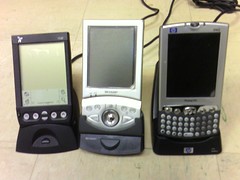
From 2000 to I think 2005, I was an avid PDA user. I went through three PDAs, shown here in a group photo:


Three PDAs in cradles

Ah, so many memories. The Visor on the left was my first PDA, a simple and well designed piece of equipment that I used with a fold-up keyboard to take field notes at Telecorp.

The Zaurus in the middle was an actual handheld PC running Linux; I quickly installed OpenZaurus so that I could perform various tricks, and I also ran Apache, MySQL, and PHP on it. Yes, that is ridiculous. The bottom part slid out to reveal a keyboard. Oh, it also took a CompactFlash card, so I acquired a CF wifi card and did a lot of surfing throughout the house.

The iPaq came at about the same time I switched my Linux laptop for a Macintosh. I had hoped that the iPaq's Windows Mobile operating system would provide a more stable and consistent runtime environment. Wifi was built in.

When the iPaq died, I faced the decision of what PDA to buy. At the top of my list was email and web browsing, which had become necessities. Fortunately, web services had really taken off by then, making SMS a de facto command line for many Internet services. So instead of a PDA, I bought a basic phone with high-speed internet capability. Here it is, two years ago.

My phone

It was much smaller and lighter than a PDA, and it allowed basic PDA-like functions. I could set calendar appointments and receive reminders via SMS. I could check email. I could do basic web surfing. I had a set of contacts, of course, which I would laboriously code into the phone. I could even look at (but not edit) my Google Docs and other services. In 2007 I began using Twitter and Facebook, mostly through the phone. In some ways that phone, with its relatively stripped-down interface, was like my beloved Visor. But without the fold-out keyboard accessory. And it began to really enhance my increasingly mobile lifestyle. I could catch up with email and tasks on the bus, for instance, or while walking across campus.

But as time wore on, phones began to incorporate other features such as GPS, and I realized that these other features were going to enhance mobility in significant ways. More on that in a future post.

Others have been comparing the G1 to the iPhone. I won't do that except peripherally. My comparisons will primarily be to my history of phones and PDAs. Look for these to come soon.

Tuesday, November 11, 2008

Reviews of the G1

As my Twitter stream shows, I acquired a T-Mobile G1 phone on Saturday. I'm still gathering my impressions, and will blog several mini-reviews over the next couple of weeks. Unlike other reviews, I won't spend a lot of time comparing it to the other devices I strongly considered -- the iPhone 3G and the Blackberry line of products -- but instead will discuss the progression that I took from PDAs to my previous phone to this one. As always, I'm thinking in terms of how this device will or will not support truly mobile work.

I was wrong about Jaiku

In the run-up to the T-Mobile G1 launch, I confidently predicted that the launch would coincide with the relaunch of Google's Jaiku service, which has been closed since Google acquired it. I noted how Jaiku could be the "killer app" for Android, providing location-based services with Twitter functionality and GMaps integration.

Well, here we are in the second week of November, and my prediction was wrong, wrong, wrong. Too bad. Google, get it together! Why don't you listen to me?

"Your business has accumulated a lot of stupid."

NotAnMBA has thoughts on how to take the opportunity of lean times to restructure your business. Less hierarchical, more networked.