Wednesday, January 28, 2009

Reading :: The Power of Identity

The Power of Identity: The Information Age: Economy, Society and Culture, Volume II
By Manuel Castells


Castells' The Rise of the Network Society was an enormously influential book in terms of understanding the emerging information economy (or whatever you like to call it). Its follow-up, The Power of Identity, was less influential - my colleagues who have started it have given up on it. For me, though, it continued to fascinate. And depress.

Whereas The Rise of the Network Society focused on the changes in work organization and structure precipitated by a number of factors, The Power of Identity focuses on how those factors are affecting social movements and politics. The network society is characterized by "the globalization of strategically decisive economic activities"; "the networking form of organization"; "flexibility and instability of work, and the individualization of labor"; "a culture of real virtuality"; and "the transformation of material foundations of life" (p.1). This transformed capitalism has been accompanied by "widespread surges of powerful expressions of collective identity that challenge globalization and cosmopolitanism on behalf of cultural singularity and people's control over their lives and environment" (p.2). Between these two trends, the nation-state is called into question, precipitating a crisis of political democracy (p.2).

Castells pledges to take an analytical view of these changes, not a right/wrong or progressive/regressive view (p.3), and for the most part he keeps that promise, though in some cases he cannot restrain himself from making value judgments. More on that in a bit.

To start his analysis, Castells outlines three types of identity: legitimizing identity, which is "introduced by the dominant institutions of society to extend and rationalize their domination vis a vis social actors" and generates a civil society; resistance identity, which is "generated by those actors that are in positions/conditions devalued and/or stigmatized by the logic of domination" and generates communes or communities; and project identity, which comes into play "when social actors, on the basis of whichever cultural materials are available to them, build a new identity that redefines their position in society and, by so doing, seek the transformation of overall social structure" - producing subjects, i.e. collective social actors (pp.8-10). The subject, he argues, is no longer built on civil society but instead on communal resistance (p.11). One form is fundamentalism, in which collective identity is constructed by "the identification of individual behavior and society's institutions to the norms derived from God's law, interpreted by a definite authority that intermediates between God and humanity" (p.13, his emphasis).

Fundamentalism -- and Castells examines it in Islamic and US Christian contexts -- is seen in this analysis as a reaction to the threat of globalization and the concomitant threat to paternalism (more about which in a moment) (p.25). Fundamentalism constructs social and personal identities on the basis of images of the past, projected into a utopian future (p.25). Similarly, nationalism in the networked society has become detached from the state (p.30); nations are "communal cultures constructed in people's minds and collective memory by the sharing of history and political projects (p.51, his emphasis - he really likes italics). Such cultural communes are "the main alternative for the construction of meaning in our society"; they tend to be defensive, culturally constituted, and reactions to social trends (p.65).

Castells explores social movements more deeply in the next couple of chapters. In Chapter 2, he discusses how globalization and informationalization result in sudden changes, resulting in resentment at the loss of control. He examines three disparate movements -- the Zapatistas in Chiapas, the American militia, and Aum Shinrikyo. The first is, of course, a case study for netwar. The second is an entirely networked movement made possible through Internet connections, incoherent in ideology but united in distrust: as he argues, the FBI searches in vain for an organized conspiracy connecting these groups, because the actual "conspiracy" flows in and emerges from the information networks (p.92). The third, Aum Shinrikyo, formed a shadow government to oppose a united world government (p.100). Despite their extreme differences, the three movements have crystallized around a common adversary, the new global order. Each movement opposes to a specific principle of identity: Zapatistas see themselves as oppressed citizens fighting for their dignity; militia members see themselves as original citizens fighting for their sovereignty; and Aum Shinrikyo see themselves as a reconstructed spiritual community (pp.105-106). In all three cases is an appeal to authenticity (p.106). And in all three cases, weapons are not owned for their own sake, but as signs of freedom and as event-triggering devices (p.106). New communications technologies are fundamental conditions for these movements to exist (p.106): "The revolutionary cells of the information age are built on flows of electrons" (p.107).

In Chapter 3, Castells performs a similar analysis of the environmental movement, creating a typology of identity, adversary, and goals for segments of the movement (p.112). He argues that environmentalism introduces a new concept of time to the global discourse - glacial time - as well as a new identity for human beings (as a component of nature within that glacial time) and a new enemy (state nationalism, which asserts control over territories) (p.126). The movement is different from those studied in Chapter 2, but the characteristics of the movement are quite similar.

Chapter 4 brings us to the crisis of patriarchalism. Castells argues that patriarchalism, a global phenomenon, is built on the patriarchal family - and that family is fundamentally challenged by the transformations of women's work and women's consciousness, transformed by factors such as the rise of the informational economy, technological changes in reproduction, and of course the surge of women's struggles (pp.134-135). Gay and lesbian movements have of course been devastating because they fundamentally challenge the molar unit of patriarchalism (p.137). These factors combine to form, not the end of the family, but the end of the family as we know it (p.139).

In particular, the network society demands more flexible workers, and women are disproportionately supplying this labor due to residual patriarchalism among other factors. This flexible labor takes the form of part-time, temporary, and self-employed work (p.173). Women bring wages and therefore more bargaining power into their households, and men lose their justification not to help with home care and childcare (p.173). In the larger trend, marriages become more egalitarian -- or break up. Castells helpfully provides a typology of women's movements (p.195). But he waxes most poetic when discussing gay and lesbian movements, which he links to the trend toward economic independence from large-scale organizations (p.205) among other factors. "The power of identity seems to become magic when touched by the power of love," he enthuses (p.221), breaking his pledge to take a strictly analytical view of identity changes. I think I can find it in my heart to forgive him.

Castells ends with a discussion of the future of the family. Men tend to fall in love romantically, he argues, whereas women engage in more complex calculations (p.230). He sees the salvation of the family in raising boys to become responsible fathers and raising girls to be able to love husbands (p.234). Marriages become reconfigured as egalitarian if they are to survive at all.

In the wake of the breakup of patriarchalism, "new personalities emerge, more complex, less secure, yet more capable of adapting to changing roles in social contexts" (p.240). Coincidentally, this profile matches the ideal knowledge worker, continually engaging in learning, continually interfacing with different workers across borders, and without hope of lifetime employment or career.

In Chapter 5, Castells turns his attention to the state. The state's days as autonomous entities, he says, are over. Economies are too deeply linked, and the only measure that can keep currency markets stable is supranational coordination -- meaning that individual states lose control over fundamental elements of their economic policies (p.245). Even US economic independence, he says, is an illusion: "likely to dissipate in the future when living standards will reflect competitiveness in the global economy" (p.246). Similarly, the nation-state is increasingly powerless in deciding budgets, organizing production and trade, collecting corporate taxes, and providing social benefits (p.254). The globalization/localization of media is tantamount to de-nationalization and de-statization of information (p.259). Crime becomes globalized (p.259). Even in terms of projecting force, the most militarily independent state -- the US, due to its independent production of warfare equipment -- is not independent in terms of committing forces abroad (p.264).

Based on these trends, Castells expected the year 2000 to be a crisis of government along small-government lines: economic populism, political isolationism, and the rejection of governmental interference in private lives (p.290). (In reality, 9/11 appears to have reversed these trends, at least in the short term.) Castells also argued that nation-states' power is threatened by the diffusion of surveillance capacity and the potential for violence outside state institutions and borders -- both of which appear to be true. We generally don't have to fear Big Brother, but we do have to worry about a crowd of Little Sisters gathering unprecedented amounts of information on us (p.300). Rather than centralizing control, the trend is toward decentralizing surveillance, leading to a surveillance society rather than a surveillance state (p.301). "In historically relative terms," he argues, "today's state is more surveilled than surveillant" (p.302).

Furthermore, the nation-state has lost its monopoly on violence to transnational terrorist networks and communal groups (like Aum Shinrikyo) resorting to suicidal violence. The state is caught in a double bind: if it doesn't use violence, it fades, but if it does, it precipitates an endless emergency, leading to fading legitimacy (p.302). (This should sound very familiar to anyone who has examined the Threat Advisory or heard speeches on the War on Terrorism.) The new power system, Castells argues, is characterized by the plurality of sources of authority and power (p.303). Nation-states now compete with the international polity as well as networks of capital, production, communication, crime, international institutions, supranational military apparatuses, nongovernmental organizations, transnational religions, and public opinion movements (p.304).

This leads to Chapter 6, the question of the crisis of democracy. To sum it up quickly: democracy is now mediated through electronic media, particularly broadcast media. To gain a groundswell of the vote, parties veer toward the political center. In the absence of sharp policy differences, scandal becomes the mode of differentiation. "With political parties fading away, it is the time of saviors," Castells concludes, daydreaming of President Colin Powell (p.349).

In sum, Castells is attempting an enormous job in this series, and he consequently covers a great deal of ground in his discussion of identity. This book was not as interesting to me as the first one, but it's still a crucial piece of the larger argument, and it gave me insights into how people are developing, self-representing, and interacting in the network society. Give it a read.

Reading :: Writing the Economy

Writing the Economy: Activity, Genre And Technology in the World of Banking
By Graham Smart


Graham Smart conducted an ethnography at the Bank of Canada spanning two decades (1984-2004), and the result is this book, which uses events over those two decades to develop genre theory within the context of activity theory. Smart agrees with McCloskey that economics is rhetoric all the way down (p.22), and accordingly his rhetorically-oriented ethnography examines how the BOC performs its three functions in its monetary policy: knowledge-building, policy-making, and external communications. During his exploration of these functions, Smart develops extensive lists of oral and written genres.

He also develops and adapts tools for analyzing them. After surveying the landscape of analytical tools that attempt to link assemblages of genres, Smart adopts three: genre sets for describing "a provisionally stable discursive system for creating, negotiating, circulating, and applying specialized knowledge" (p.12); genre systems for describing "an inter-organizational realm of discourse comprising genres used by two or more organizations to interact communicatively and develop knowledge mutually relevant to them" (p.12); and genre chains for describing "sequences of genres that exhibit what Fairclough refers to as 'systematic transformations from genre to genre'" (p.12).

The organization Smart describes changes relatively slowly: "relatively new" genres have "emerged in the last decade" (p.141).

What emerges from this is a fairly detailed understanding of the BOC's practices and how genres mediate them. Just as importantly, Smart moves toward a more integrated framework of analytical tools for genre, a timely endeavor.

Tuesday, January 27, 2009

Public rural broadband

techPresident has a story on the proposed public rural wifi initiative the new administration is pushing: "the build out of high-speed Internet in unreached parts of the U.S. to the tune of about $6 billion." This is a fairly large initiative at a time of economic hardship. On the other hand, Internet access is the lifeblood of the knowledge economy, and spreading access across rural areas should accelerate the trend of individuated, flexible labor in knowledge work. More on this later, maybe.

Wednesday, January 21, 2009

States can employ netwar too

In Arquila and Ronfeldt's book Networks and Netwar and Castells' The Power of Identity, among other sources, the Zapatistas are singled out as an example of how a militarily weak force can leverage non-governmental organizations and public media to forestall crippling attacks by state armies. That is, a networked organizational structure can successfully prosecute asymmetric war against a state by stringing together other actants.

One particular state - Israel - has been active in leveraging this networked model for their own advantage. Wired's Noah Schachtman chronicles how Israel has been using digital video to document their operations "to defend themselves in the court of public opinion" -- for instance, by documenting the presence of anti-aircraft cannon inside mosques that they subsequently bombed. To distribute the video, they circumvented the established media and set up a YouTube channel.

We'll see more of this across conflicts, I think, as global information and monetary flows increasingly bind states and make "the court of public opinion" more critical for states' military operations.

Monday, January 19, 2009

"Let me transfer you to Unsupported Devices."

So I'm perfectly happy with the T-Mobile G1, which uses Google's Android OS. The phone is clunky, and the UI has that beta software feel, but as a remote internet terminal it's great. Especially the push email and IM.

My wife likes the idea of Android, but not the form factor. It felt like a brick to her. So instead, we bought a secondhand iPhone 3G, jailbroke it, installed yellowsn0w, and stuck in the T-Mobile SIM. Voice worked immediately. When we called T-Mobile about the data plan, we were reluctant to admit that we were trying to attach an AT&T phone to their network - but they were perfectly at ease with it, suggested a data plan, and told us when we could expect to have the plan kick in.

So if we both had smartphones with always-on internet, why would we need that expensive SMS plan? We'd just IM each other, we decided, and cut the SMS. "Are you sure?" the T-Mobile rep asked my wife. "He sent over 1200 text messages last month alone!"

The next day, the iPhone wouldn't catch the internet, so we called tech support. "Let me transfer you to Unsupported Devices," the T-Mobile representative said. The name was an oxymoron, like "jumbo shrimp" or "military intelligence" or "too much garlic." Anyway, the tech at Unsupported Devices quickly identified the problem and led me through the steps.

Then we came to an ugly realization: The iPhone doesn't support push email and IM. You actually have to check it yourself. Yes, AT&T has some sort of enterprise plan and a more general service is in the works, but that will be based on their network; T-Mobile won't support it. So our plan to IM each other had run into a real snag.

Today, we turned SMS back on. Expensive? Sure. But we rely on that instant connectivity more than we knew. And I also began to realize that we text our friends and family a lot - people who don't check email or use IM or own smartphones. That is, we weren't paying for the service so much as the network to which it gave entrance.

My wife has concluded one other thing. She had thought the iPhone would be like a little computer. But it's crippled: you have to connect it to a desktop or laptop computer in order to download applications, and other independent capabilities are similarly stunted. In contrast, the G1 never has to be connected to a device - and if it is, it's just seen as an external drive. "I want the iPhone and G1 to get married and have offspring," she concluded, "and that's the phone I will buy. It will have the body of the iPhone but the brains of the G1."

So here's what I will conclude. I really appreciate T-Mobile's attitude toward unsupported devices. If only we could extend that to all devices, allowing us to switch them from network to network seamlessly and without gray-market hacks! How much effort that would save us. Open devices, open standards, open roadmaps would increase the value of these devices and the services attached to them - at least for us.

The new portfolio

At Confused of Calcutta, JP continues to crank out some great posts about the changes being brought by new information technologies.

In "Musing about lifestreaming and learning," JP examines the Feltron Report, Nick Feltron's report on his personal activities for the year. The cost of collecting, aggregating, summarizing, and posting tremendous amounts of personal data has dropped, making it possible to assemble a "portfolio" or "CV" or appraisal stream of one's activities. The result is potentially exhibitionism, or pervasive surveillance, or accountability, or - I hope, in some cases - an accounting of informational worth or social capital across one's many networks.

In "Thinking about Twitter: a submarine in the ocean of the Web," JP describes the many ways that he uses Twitter. In a way, this is the flip side of the lifestreaming post: he looks at the fraction of people's lifestreams that bleed through on Twitter and makes judgments about sources, services, and content via their recommendations. This post provides a nice view of how social capital (using the term loosely) is created through the "capillary conversations" going on in this part of the lifestreams.

Taken together, these give us a broader idea of what the new portfolio should look like. I see applications to formal (academic) programs, but other realms as well.

"Now, my working assumption, and this is not new, is that everything I write on e-mail could end up being on CNN."

Obama talks about his Blackberry, echoing my working assumptions about my email, texting, and Twittering.

Written Communication: Special Issue on Writing and Medicine

If you're doing something in medical rhetoric or medical writing, consider Written Communication's upcoming Special Issue on Writing and Medicine.

The Prospects for Cyberocracy

David Ronfeldt, who has been instrumental in my thinking about networks and netwar, has recently retired from RAND. But he has also just published a paper on the prospects for cyberocracy, and is also now blogging at http://twotheories.blogspot.com/ . Looking forward to reading both.

Thursday, January 15, 2009

Coworking in Austin: Soma Vida

This blog post is the first in a series of posts on my visits to alternative working spaces in Austin.

The Space

As I walked into Soma Vida, a center located in a recently gentrified neighborhood in East Austin, I was reminded of a high-end yoga studio. The beautifully refurbished building - originally "built as the result of a cooperative venture between the African American churches in the community at the time which provided the house for women who were widowed," I was later told - has a roomy interior sectioned into various spaces, including spaces for child care, massage therapy, acupuncture, and meetings. And, of course, an actual yoga studio.


Soma Vida also has a coworking space, with individual desks set up in front of long padded benches arranged in an L shape.


Since I was early for my appointment, I grabbed a cup of fair trade coffee from the kitchen, then settled in to do some coworking of my own. Three other people joined me, one giving me the password for the wi-fi. Two of the coworkers occasionally spoke to each other in low voices, and a stereo played world music from the other room. Beyond that, the coworking space was quiet and serene: Soma Vida's coworking policies state that

Although we strongly encourage collaboration among members, we ask that members respect each others' needs for quiet enjoyment. Networking and lengthy conversations are welcome in one of our many community spaces which include our lounge area, kitchen, and outside garden areas.

In fact, later on, I heard one such conversation drifting in from another area of the building. It turned out to be Laura Shook, one of Soma Vida's co-owners, finishing up her previous appointment. She dropped by to see me, and we went to her office to discuss coworking.

The Philosophy

Soma Vida, which has been open since July 2008 and has included coworking since August 2008, is described in the brochure as "a work/life balance and wellness center." (Hence the name Soma Vida, from the Greek soma (body) and the Spanish vida (life)). It aims to be a cross between an alternative entrepreneurial space and a community center, with the co-owners and tenants sharing the space and periodically leasing parts out for community oriented workshops (such as soul coaching, harmony meditation, and raw food instruction). As Laura told me, Soma Vida had been conceived as a way to balance self, work, and family: their website expresses this balance under the headings "live well," "work well," and "play well." The center was founded on the question: What do people need to achieve this balance?
  • To encourage living well, Soma Vida provides space for yoga and pilates, acupuncture, massage, somatic psychotherapy, naturopathic medicine, herbal consultations, and parent well services. (Laura, a licensed psychotherapist, conducts the therapy.)
  • To encourage playing well, Soma Vida provides child care and children's classes.
  • And to encourage working well, Soma Vida provides work-life balance coaching (conducted by Laura's business partner, Sonya Davis) and, of course, coworking.

Soma Vida's philosophy, Laura explained, is summed up by Sonya's phrase "business the feminine way," an approach that emphasizes integrating family and community with work and that leads away from the dominant masculine paradigm of hierarchies toward a more feminine paradigm of relationship-building. That did not mean excluding men: in fact, Soma Vida draws "mom and pop-reteneurs," entrepreneurs who were also parents and did not want to give up their family life. To that end, Soma Vida works to integrate children into the entrepreneurial community.

Laura related that this philosophy of work-life balance is not just academic: she and Sonya are both single parents and entrepreneurs, and both had felt the isolating effects of trying to juggle one's own business with child care. "How do you do yoga when you can't get child care?" she asked rhetorically. More broadly: How can you maintain a work-life balance when you're working out of your home during the day and in sole custody of your child the rest of the time?

So Soma Vida's adoption of coworking followed from this work-life philosophy, becoming one other service that contributed to restoring a balance to people's lives. One of Laura's friends told her about coworking, pointing to In Good Company in New York City and Cubes & Crayons in Menlo Park, CA. In those areas, Laura explained, coworking was driven by entrepreneurs who did business in high-expense, high-density areas but could not afford to office or live in those areas. Austin, with relatively low expenses and density, was a bit different, but it still was open to alternative ways of sharing spaces due to the high number of entrepreneurs and their openness to innovation.

Unknown to Laura and Sonya, others had also started coworking spaces. A few blocks south, Conjunctured had leased a house and turned it into a coworking space oriented toward knowledge workers, particularly young independent contractors. (I profiled Conjunctured last year.) Only a mile away, Julie Gomoll's Launchpad Coworking is preparing to launch a high-end space primarily to serve telecommuters for larger companies. (See Julie's profile of Soma Vida.) Laura doesn't see these spaces as competitors, and in fact Soma Vida and Conjunctured refer people to each other. It's all about fit, she says.

Laura is optimistic about the prospect of business even as the recession deepens. With upcoming layoffs, she believes that businesses will begin to outsource more work to entrepreneurs, and those entrepreneurs will need ways to share resources, network, and regain community. The coworking space provides a more serene and stable environment than a coffee shop, the tenants have six-month leases that are reasonable compared to running their own space, and each tenant's clients are potential clients for other tenants and the space as a whole. In fact, Laura believes the Soma Vida model could spread to other places, tailored to fit other communities, with the end goal always being empowerment and cooperation rather than competition.

Soma Vida has also pursued the alternate economy of the Austin Time Exchange, a system that allows members to "bank" rather than barter services.

My Thoughts

I've studied work in a number of different contexts, including corporate buildings, nonprofits, police stations, academic offices, and home offices. Soma Vida is a bit different from these, particularly because of the specific philosophy that grounds it. As Laura said, Soma Vida is a cross between an entrepreneurial center and a community center, and coworking is a relatively small (though important) part of its mission.

Will the Soma Vida model spread? I think it has a chance to do so, particularly in areas with high concentrations of knowledge workers. Several factors conspire to make this time perhaps a strong one for such a model.
  • First, comparatively more work is being done in the knowledge work sector.
  • Second, knowledge work is increasingly being performed via information technologies: laptops, servers, mobile phones.
  • Third, consumer-grade versions of these technologies are available, relatively cheap, and powerful enough to accomplish the tasks that until now have required corporate apparatus.
  • Fourth, companies are cutting permanent staff in non-core areas, outsourcing more knowledge work to independent contractors in order to increase flexibility and become more agile (and to lessen the burden of employment benefits).
  • Fifth, independent contractors are already assembling federations of subcontractors for each project, meaning that they must assemble and maintain networks of contracts in order to remain competitive.
  • Sixth, these independent contractors are not necessarily as interested in profit as they are in autonomy. Especially those with young families, I suspect.
Given all of these factors, I think we'll see several spaces emerge with differing philosophy and clientele. Certainly the coworking spaces in Austin appear to be very different. More on that as I visit these other spaces.

Wednesday, January 14, 2009

So it looks like I might have been wrong about Jaiku ...

... which I had over-optimistically predicted would be a potential killer app for Google Android, bringing location-aware social networking to the platform. Jaiku has been slashed, along with Dodgeball, Google Notebook, and some other Google services. RIP.

This Rickrolling thing has really jumped the shark

Michael Arrington complains that "Nancy Pelosi, Speaker of the United States House of Representatives, posted a video of her cats on her official YouTube page and then promptly RickRolls viewers at the 37 second mark." Click through to see the video if you dare.

What I thought was especially telling was that after the Rickrolling starts, a message pops up. "Don't know why you're seeing Rick Astley's 'Never Gonna Give You Up' right now? Google 'Rick roll.'" Yes, explaining a joke that is 20 months old really makes this seem cutting edge.

Arrington concludes:

This is the person who becomes President of the United States of America if the right two people go down.

I’m moving to Canada.
And in response to a dissenter on Twitter:
@robinwauters it makes you smile because you live in Belgium. We have real problems to solve. She's suppos ed to be solving them.
Ouch.

Politicians are in a tough spot, I suppose, trying to seem relevant especially after the runaway popularity and pop culture diffusion of Barack Obama's candidacy, while still seeming in touch with the reliable contingent of older voters. Rickrolling people seems like exactly the wrong way to do it. But I strongly doubt Pelosi touched this project more than perhaps to approve it; probably some overzealous interns were the ones to film the cats, select the clip, etc. Pelosi is busy trying to consolidate the speaker's power instead. Reassured?

Sunday, January 11, 2009

Twitter's follower/following/@ ratios

At Confused of Calcutta, JP examines a study of Twitter in the latest First Monday. The conclusion of the study: "the driver of usage is a sparse and hidden network of connections underlying the “declared” set of friends and followers." Specifically, the people receiving the @ messages.

JP interprets:

This by itself is not surprising: as the authors point out, every community, every social network, evinces a similar pattern. We send e-mail regularly to a very small portion of our address book; we call a very small portion of our mobile contacts; we reach out to a very small portion of our Facebook “friends”. This sort of behaviour is true even in other communities; for example, there are a number of opensource projects that behave similarly.

But he believes that this number of direct contacts has the potential to be raised in social software. I think he's probably right, but I also think that Twitter's - and Facebook's, LinkedIn's, MySpace's, and others' - status messages serve other purposes.

Here's how I explained it in a recent talk. When I was a kid, I played soccer. And my coach - who was also my father - emphasized that we should communicate constantly. So in our games, we would constantly be calling things out. Often this was encouragement (“good work!”); sometimes it constituted alerts (“man on!”); and sometimes it was just status (“I’m behind you”). But in aggregation, this chatter constituted what we might call ambient status: when the whole team does this, any given player has a pretty good idea of where the other players are, without looking. If I have the ball, and I hear my team's voices, I know where they are without having to scan the field.

For me, the bulk of my Twitter usage is in assessing ambient status. I get a sense of the trends in the fields in which I work, but also the well-being of my contacts. I see when they're engaging in activities similar to mine. I can tell when they're struggling with particular issues. I can get a sense of what they're reading, writing, and studying. I know when they're sick and when they're enthusiastic and when they're uncertain. And sometimes I push out encouragement, alerts, and status myself, not necessarily directed to a specific person, but to the whole ad hoc "team."

So, yes, directly addressed connections are important, but they aren't the point of my individual Twitter use. I suspect this is true for many people who use Twitter heavily - and people who try to use Twitter primarily as a medium for direct connections are consistently disappointed by it.

Wednesday, January 07, 2009

Analyzing reputation systems, or a new look at claims

Randy Farmer and Bryce Glass are drafting a book on reputation systems, and a draft chapter is now online. What strikes me about the chapter is that in some ways it strongly resembles the Toulmin analysis that we sometimes assign to rhetoric and composition students in first-year courses. (I'm thinking particularly of my colleague John Ruszkiewicz's textbook Everything's an Argument.)

In a Toulman analysis, the student identifies a claim, supported by reasons, which in turn are supported by evidence. Here's an example:
CLAIM: Harvard is not the best law school for my needs.
REASON: Harvard is expensive.
EVIDENCE: Bill says that Harvard is expensive.
In this case, the evidence is ethos-based: we take it on Bill's authority that Harvard is expensive. His authority constitutes the evidence that underpins the reason. Obviously we could look at other kinds of evidence - for instance, we could undertake our own comparison - but at some point ethos underpins evidence, since we can't investigate everything in the world, even if we had the expertise and inclination to do so.

In reputation systems, of course, it's ethos all the way down. All evidence is explicitly grounded in ethos. So Farmer and Glass say that

All of these reputation statements—and many more besides—can be generalized as:

There's the claim, just as in the Toulmin analysis. But the claim is always an evaluative claim about a target, sometimes explicit, sometimes implicit. And the claim is always underpinned by explicitly ethos-based evidence, which means that we must identify a source. So, in my reading, Farmer and Glass' basic analysis of reputation systems is a special case or subset of Toulmin analysis.

An implicit reputation statement, the authors continue, might look less like an argument although it still is:
And, for completeness, here's another. This is actually an action, and is an implicit reputation statement about the quality of Harvard.

Yes - since reputation statements are built on ethos, a statement like this one - which short-circuits the reason and instead supports the claim with the simple evidence of someone's action - is a legitimate implicit statement. In isolation, such statements stand or fall on the authority of the source (Wendy). But aggregation means that the statement rests on the authority of many, many individuals (Wendy+Suji+Elton+Trudy+ ...). The individuals may have very different evaluative criteria - which is why I always look at Amazon comments, not just ratings, for instance - and arguably each endorsement can be analyzed as a separate argument. But the aggregation becomes its own argument; at some point, we start treating the aggregated endorsements like the index of a set of diversified stocks.

It would be interesting to apply this approach in a rhetoric class, I think, especially since such arguments are increasingly influential. For that reason among others, the book holds a lot of promise, especially if the authors can deliver on this promise:
But this book will attempt to propose a system that accomplishes this very thing for the social web: for the multitude of applications, communities, sites and social games that might benefit from a reputation-enriched approach, we'll take you—the site designer, developer or architect—through a process for: defining the targets (or the best reputable entities) in your system; identifying likely sources of opinion; and codifying the various claims that those sources may make.
Looking forward to seeing more of this.

Supporting the activity of homeschooling

Via Joshua Porter, here's a service for supporting homeschooling. From the blog announcement:
What is MyHomeSchoolPlan.com. Simply put, it is a web application that allows you to create, record, and review your homeschool activities quickly and easily. We want you to spend time with your kids, not your computer, so our focus has been on quick and easy setup. Create your courses, enroll your students in the courses and you are ready to create this week’s schedule. Are you someone who prepares your schedule a month in advance? Terrific, we have recurring activities and easy input to build your schedule as far out as you like. Or are you someone who creates your schedule the night before (like at our house, ahem)? No problem, we make it easy to enter tomorrow’s activities before you drop off to sleep.
Zuboff and Maxmin point out that the rise of homeschooling relates to the more general desire for customized experiences. This desire manifests elsewhere as a trend toward co-customization (Victor & Boynton, theoreticaly elaborated by Engestrom). On a related note, Castells argues in The Power of Identity that the US is undergoing a kind of shear across local, state, and federal control, a shear that (particularly on the right, at least in 1997) manifests in terms of shifting control over money, mores, and education to individuals or local authorities. The trends toward (1) localization of control and (2) customized experiences are greatly abetted by the spread of information technologies, so I am not surprised to see that sites such as MyHomeSchoolPlan.com are being constructed. In fact, I expect that far more such communities are developing sub rosa in Facebook, Ning, Google Groups, and other community venues.

What will be really interesting to watch, I think, is how such communities handle localization issues related to state and county statutes. Online communities connect far-flung locations in rhizomatic networks, but those locations are also spatially, legally, and economically situated within hierarchies and markets. So we can expect to see mechanisms for adapting general solutions (in this case, homeschooling solutions) to specific locales, whether those mechanisms are formal or informal.

Wednesday, December 17, 2008

Reading :: Organizing Modernity (second reading)

Organizing Modernity: Social Ordering and Social Theory
By John Law


I reviewed this book a while back, and was not kind. But reading Law's After Method made me decide to reread the book, especially after running across a reference to the project management aspects of Law's case. So I took another crack at it. The second read was more positive. I still wouldn't place this book high on a reading list -- it's still my least favorite of Law's books -- but it does have some virtues.

The book is a study of order and ordering at the Daresbury Laboratory. But -- and this fact is what yielded my previous review of the book -- it is just as much an introspection of the role and limits of the ethnographer in such a study, as the ethnographer is involved in his or her own ordering project. Law's angst throughout the project is due to becoming acutely aware that his own ordering practices -- what data he collects, what he chooses to analyze and write, how he presents the results -- are as artificial and partial as those he observes at the site. This realization is often crippling, and Law writes of having to retreat from the site to his car to have lunch, of worrying that the real action was always happening elsewhere, of fearing the power and status of his participants. (Really, it's a very fearful book, and intentionally revealing in its fear.)

Law argues that "perhaps there is ordering, but there is certainly no order" (p.1). So, he wonders, what material conditions enact this ordering? What are the social technologies of control? If we accept that there is no root order (p.2), and that the social is materially heterogeneous (p.2), how do we understand ordering? To find out, he embarks on an organizational ethnography of a world-class science lab (p.3), and he examines his own ethnographic work for ordering as well. The last he sees as vital: "Let me put it this way: as I describe the Laboratory I do not always want to make myself invisible. ... I believe this would be wrong because ethnography is also a story of research - and in some measure a tale about the conduct of the ethnographer as well" (p.4).

And so, instead of going about this task the traditional way, with a well-developed methods chapter, Law engages in a lot of introspection in this book. At points I felt as if I were his therapist, as he claims that "we [ethnographers] all go native" (p.39); as he describes how his introvert nature led to feelings of shame and how his retreat to the library allowed him to regroup without shame (p.45); as he admits that he is "shit scared" during ethnography work and he wonders why other ethnographers don't admit this (p.148); and as he frankly describes his fear of powerful people in particular. All of this was work for me, particularly in that I actually don't identify with most of what he's describing and trying to impute to ethnographers in general. At one point, he lucidly describes how enterprises as a matter of course maintain a front stage and a back stage, but then he explicitly disallows this approach from his own writing (pp.178-179). No back stage for Law: his ethnographic writing must be personal, reflexive, and bare: "And I choose to do this in a way which I now think is part humanist - that is by laying myself, as a person, on the line" (p.190).

But wait a minute. Law elsewhere argues (as a student of relational materialism should) that
a person is an effect, a fragile process of networking associated elements. It is an unusual theory of agency only to the extent that I want to fold the props - and the interaction with the props - into the person. And I want to do this because without the props we would not be people-agents, but only bodies. So this is a theory of agency, but it is more than a theory of agency. Or, to put it another way, it is a theory that is not simply about people. And here's where I part company from some kinds of social theory. Unlike many, I don't think that actors or agents necessarily have to be people. I'm uncertain, but perhaps any network of bits and pieces tends to count as an agent if it embodies a set of ordering processes which allows it (or others) to say 'It is an agent, an actor.' (pp.33-34)

Given this view that people are network effects, I am not clear on how Law achieves his revealing of the backstage, i.e., his baring of the self or authenticity. Particularly in this mode, writing, which as Law points out is ordering work: an effect of context that tends to hide that context (p.31). In writing the ethnography, Law has made conscious decisions to foreground or front-stage certain things while backgrounding or back-staging other things. To put this another way, Law's revealing of his innermost thoughts is also constructed, and when he pulls the curtain aside to reveal his backstage, that act itself is a bit of misdirection, since the backstage itself has a backstage. As Law discusses earlier on in a bit on reflexivity, "there is no reason to suppose that we are different from those whom we study" (p.16).

Maybe here, at the end of the review, is a good place to discuss modes of ordering: "I think of them as fairly regular patterns that may be usefully imputed for certain purposes to the recursive networks of the social. In other words, they are recurring patterns embodied within, witnessed by, generated in and reproduced as part of the ordering of human and non-human relations" (p.83). And in these terms, we might think of Law's self-reflexive ethnography as a mode of ordering, an attempt to adapt and further the genre of self-reflexive ethnography with the purpose of encouraging reflexivity across the social sciences.

And although this book forges some interesting connections for those interested in relational materialism, perhaps that's the chief contribution of this book: to perform reflexivity in a way that allows budding ethnographers to communicate among themselves what sorts of challenges they face as they become ethnographers. On second reading, I could see this book being used as a performance in an introductory class on qualitative research methods.

Tuesday, December 16, 2008

Reading :: Documents

Documents: Artifacts of Modern Knowledge
Ed. Annelise Riles


Documents are a big deal to those of us in writing studies, particularly technical communication. But to ethnographers, they have not typically been attractive foci. Yes, they are analyzed along with other artifacts, but (as Riles suggests) they usually take a back seat to field observations and interviews. Perhaps, she says, documents are despised by ethnographers because studying them means that ethnographers treat their own knowledge as just "one instantiation of a wider epistemological condition" (p.7). (See the article "Chains and Ecologies" that Mark Zachry, Bill Hart-Davidson and I wrote a while back for some thoughts about this issue.)

But interest in documents is picking up in ethnographic circles, due in part, no doubt, to the rapid spread of documentation and the trend toward ethnographies of workplaces and bureaucracies. This volume gives us some idea of this interest. For me, as a rhetoric and writing professor and workplace researcher of writing, the project is interesting in outline: what do ethnographers think of documents, and what new perspectives will they bring to bear?

In practice, I regret to say that the insights are not startling. The authors of the collection's pieces study NSF proposals, documents used at the UN, cases and parent-generated biographies of infants, attributions in scientific articles, intake records at a Papua New Guinea jail, university mission statements in the UK, and documentation of Fiji gift-giving. Each of these cases is interesting and each has flashes of insight - particularly the chapter on infant biographies. However, most focus primarily on representation of the documentation's author or subject, and none really dig into how the documents are interwoven into complex activity, either in routine problem-solving or novel situations. In other words, we learn a lot about how biographies and intake records represent and socially shape infants and convicts respectively; but we don't get to see how these representations travel across bureaucracies, become transformed in relation to other documents or activities, or develop over time in response to recurrent needs. In retrospect, I am a little startled at how focused the investigations are on specific documents and subjects as opposed to the bounded systems in which they function.

So who should read this book? If you're interested in representation in documents, or if you want an ethnographic take on documents -- particularly document types similar to the ones above -- this book might be worthwhile. If you're already in writing studies and are seeking cases that will deepen your understanding of how documents work, though, I wouldn't put this book at the top of the list.

Reading :: The Tipping Point

The Tipping Point: How Little Things Can Make a Big Difference
By Malcolm Gladwell


What can I say about The Tipping Point? It's a national bestseller -- as well as a former First Year Forum selection at the University of Texas (meaning that it was taught in all first-year composition courses that year). The author, Malcolm Gladwell, became tremendously well known based on it. And it apparently helped people think very differently about "how little things can make a big difference," as the subtitle suggests. It's compellingly written and accessible.

And yet I felt frustrated by it. Gladwell wants to study human phenomena such as trends, crime, and the popularity of children's shows, and he wants to answer the question of how they reach the "tipping point," the critical mass beyond which change happens rapidly. To understand the tipping point, Gladwell investigates it in the same terms as epidemics, an approach that has some inherent attraction to me. Gladwell's approach is to set up a three-legged stool for understanding how tipping points occur: "These three agents of change I call the Law of the Few, the Stickiness Factor, and the Power of Context" (p.19).

The Law of the Few is that "in a given process or system some people matter more than others" (p.19) - whether those people are spreading gonorrhea or networking with others in a business capacity. Gladwell subdivides these into Connectors (people who make connections with others), Mavens (people who learn about and educate others about their particular specialty of information), and Salespeople (people who are unusually persuasive and charismatic.

The Stickiness Factor "says that theere are specific ways of making a contagious message memorable; there are relatively simple changes in the presentation and structuring of information that can make a big difference in how much of an impact it makes" (p.25).

Finally, "The Power of Context says that human beings are a lot more sensitive to their environment than they may seem" (p.29). Gladwell provides several examples of how contextual or environmental factors appear to have a causal relationship with certain human behaviors we would normally consider individual.

Okay, none of these laws seem earth-shattering to someone who's read much in the sociocognitive literature. It's a systems approach. So why did I find it so frustrating? I think it's for two reasons. One, Gladwell's typology isn't that well fleshed out. We get many engaging stories, but it's hard to know how well these three factors cover or explain the phenomenon. The book popularizes the typology, but it doesn't make a strong case for it. In particular, we don't get a good sense of how the three relate, when one accounts for the phenomenon vs. the others, or how they interact to collectively explain phenomena. We might even begin to wonder what other factors are out there. Are there others? Are others even more important? It's impossible to tell from this book.

The second reason is a bit more focused. Gladwell's typology has a built-in tension related to agency. How much can be explained by individual agents whose individual, situated actions matter more than others - the Law of the Few? How much can be explained by the system, particularly the context, in which agency is reduced to a network effect -- the Power of Context? And how much is explained by how alike audience members are - the Stickiness Factor? Gladwell asserts that each is important, but doesn't seem to deal with three very different understandings of human agency here, much less attempt to reconcile them.

Nevertheless, Gladwell writes about these cases well and does a great job illustrating the three principles he's forwarding.

Friday, December 12, 2008

Reading :: Designing Collaborative Systems

Designing Collaborative Systems: A Practical Guide to Ethnography
By Andy Crabtree


Designing Collaborative Systems has favorable blurbs on the back by Graham Button (XEROX Research Centre, Europe) and John A. Hughes (Lancaster). So it shouldn't be a surprise that the subtitle "a practical guide to ethnography" really refers to the particular strain of ethnography that Button, Hughes, and others such as Lucy Suchman use: ethnomethodology. As Crabtree explains in Chapter 3, "the term ethnography denotes neither a unified method nor a coherent school of thought. Rather, and as Shapiro makes clear, the term ethnography is a gloss on various and different analytic formats" (p.87).

In fact, as is typical of ethnomethodology, Crabtree argues strenuously that ethnography should not take an analytic format as a starting point (in a footnote on p.87 he singles out activity theory on this point), and he even objects to research protocols in general: "What is seen through research protocol, is not a reflection of cooperative work, but a function of the methods applied and the theorizing done by the researcher in applying them" (p.49). Instead, he urges researchers to "set aside his or her preconceptions and instead be faithful to the phenomenon, exploring and inspecting Work Organization as it is observably 'put together', constructed and assembled by the Organization's staff in their real time collaborations" (p.50). Therefore, he says that the first phase of investigation is Exploration, in which the researcher should "start anywhere, with any person that looks approachable and least likely to be bothered by the presence of a researcher, and collect as much material as possible of whatever sort is appropriate" (p.51). The researcher then proceeds to Inspection (in which categories emerge) and Analysing.

It would be easy to get caught up in the family fight among competing qualitative traditions here -- I'm not in the ethnomethodology camp, although I can see its appeal -- but instead let's talk about how Crabtree develops these ideas. In Chapter 2, Crabtree takes us through ethnomethodological data collection and analysis, discussing its philosophical and methodological suppositions along the way. In Chapter 3, he discusses how to apply ethnomethodology to work studies. Then, in Chapter 4, he introduces us to participatory design and its methods, along with some history of its development and controversies. Finally, in the Summary, he provides the purpose.

Yes, in the Summary! Crabtree answers the question that I had been asking the entire way through. After all, the text seemed too advanced for people who were just coming to ethnomethodology without a social science background, such as students or working software developers. On the other hand, the discussion of methods and methodological underpinnings seemed too elementary for those with qualitative research backgrounds. The material seemed too vague and too background-heavy for a how-to, and too practice-oriented for a methodology text. It didn't situate the methodolgy well among other methodologies. It tended to show more than tell, with large sets of data displayed in the later chapters but rather thin discussion of how to collect and analyze one's own data. So who was this book supposed to reach?

Here's what the Summary says:
The purpose of this book has been to sensitize the reader to a discrete ensemble of practical strategies and methods for the study of work and the use of ethnomethodologically-informed ethnography in the creative process of design. The book took its departure from the requirements problem and the inadequacies of HCI formats and methods for describing, analysing and representing the design space. ...

... The format articulated herein is practical rather than theoretical in character and is intended to orient the analyst to important features of the workplace or factors to be taken into account when observing and describing work and undertaking analysis of the design space. The primary orientation here is to cooperative work. ... (p.165)


And that's as clear an answer as we get.

So to whom would I recommend the book? Graduate students who are conversant in qualitative research, conversation analysis, or ethnomethodology and who want to apply these skills to cooperative work.

The future of mobile phones in a global recession?

I started thinking about this question recently, when it became clear that we were heading into a recession (at best). How is it going to affect workplaces, especially technology-centric work, and the consumer space, which has enabled so many of the changes we are seeing in knowledge work? And in my personal life, would I give up my mobile phone?

Along those lines, I was interested in Tomi

Loopt comes to Android

Finally, a major location-based social networking service comes to Android. Reviews are good. Has anyone else had experience with Loopt?

"It's an inauspicious time to decry helpful, even vital democratic initiatives in favor of ideology ..."

That's Chris Dannen of Fast Company, complaining that "President Bush has expressed disapproval of the free nationwide Wi-Fi proposal being considered by the FCC and Congress." He explains the proposal in this way:

The legislation, which is before Congress now, would require whoever buys the chunk of wireless spectrum being auctioned next year to set aside a quarter for no-fee service to rural areas that don't have broadband access.

The spectrum being auctioned, called the Advanced Wireless Services (or AWS-3) spectrum, is being vacated by television broadcasters, who must switch to wired digital broadcasting in January by federal mandate. That leaves a new swath of "white space" free to be leased by the highest bidder.

Without getting into the proposal itself, I want to point out this instance in light of the principle of universal service.

As I discuss in Network, the idea of universal service first meant simply the ability to place calls from any phone to any other. Later, it meant total market penetration: close to 100% of people who wanted phone service could obtain it. But in the Telecommunications Act of 1996, it began to take on a new meaning, as a universally obtainable slate of services. Common services, such as call waiting, can be considered part of basic service once they achieve a certain level of market penetration. So the slate of services that define basic telecommunication is continually evolving; today's innovations become tomorrow's basic service.

The exigence for this? "[T]he assumption that access to up-to-date telecommunications is now the material basis for individuals' participation in democratic society" (Spinuzzi 2008, p.108, italics in original). We still pay a luxury tax for telecommunications service, but that service is now considered vital to our democracy. That's what jumped out at me about the quote above, which sounds passable now but would sound completely ludicrous in 1983.

Monday, December 08, 2008

G1 review: Cooking Capsules

One of the most interesting and unique applications for the T-Mobile G1 is Cooking Capsules, which is essentially a cooking show for your phone.

If that sounds bizarre, let's keep in mind that the G1, like the iPhone, is more like a handheld Internet device that just happens to have telephony as one of its features (in the G1's case, not a particularly central feature). The G1 is a lifestyle device, and cooking certainly fits into people's lifestyles.

So back to Cooking Capsules. The application currently has six recipes, each of which has a two-minute video, a shopping list, and step-by-step directions in a tabbed interface. So you watch the video to get a sense of how the recipe is put together, use the shopping list in the store (why not?) to select your ingredients, then follow the directions as you cook. If you learn more easily by listening, you can revisit the video at any time. And if you have trouble doing sums in your head, the shopping list has a slider so you can make anywhere between two and eight servings. (The default is four servings, and the video and recipe directions don't change, so you'll still have to figure out the quantities at some point.)

The videos are nicely put together. They don't have stellar production values, but they are nicely done, and they look stunning on the little G1 screen. The two sets of recipes (Indian and French) have different intros and engaging music that will get stuck in your head. To keep videos under time, the producers make liberal use of Baz Luhrman-type video speeding through potentially boring parts (such as pouring liquids). I noticed some pausing and stuttering in the video stream, but only sometimes -- usually around dinnertime, which makes me think that perhaps the CC servers were in heavy use at that point.

Shopping lists and directions are both nicely clear. Both allow you to check off items. In fact, I was really impressed with this setup, which offers a lot of potential for delivering instructional materials.

So how did it work? I botched my chana dal (I rushed the simmering a bit), but the dish still turned out passably. I'll have to try another dish soon. My guess is that after the first of the year we'll see a lot more recipes - and we'll be charged for them. Fair enough.

Saturday, November 29, 2008

Tuesday, November 25, 2008

Social networking within the enterprise: A report from the front

Mike Gotta of the Burton Group is using a variation of contextual design to analyze data on social networking within the enterprise. His project looks valuable and ambitious, and I'm looking forward to seeing what he produces.

Wednesday, November 19, 2008

G1: Text messaging

As I said in the last review, the G1 is an indifferent phone. But when it comes to texting, it's really quite good.

That's not just because of the keyboard, although the keyboard certainly helps. As I intimated in an earlier post, one big reason I didn't go with the iPhone was its lack of a keyboard - or, really, any physical buttons beyond the single button at the bottom. It reminds me of Apple's one-button mouse. The G1 has four physical buttons plus the world's smallest trackball, which is arguably overkill, but I'm not complaining. I can choose not to use a button. But I can't choose to use one that's not there.

Without the keyboard, iPhone users have a problem. To use this elegant piece of hardware, they have to inelegantly hold it in one hand while repeatedly jabbing it with the forefinger of the other hand. Although the softkeys are not too small for everyone, I found them to be very hard to select in my in-store tests. Sure, I might get used to them. But I would still have to jab the device with my forefinger. No thanks.

In contrast, the G1's keyboard is like a Sidekick's, hidden beneath a screen that you slide out. When you do this, the screen orientation changes to horizontal and you can type with your thumbs. Both thumbs. In practice, this is a lot faster. (Although it's not as convenient as texting on the physical ten-key of my old phone with predictive text activated. I really liked one-handed texting, but that won't be an option on the G1 until someone comes up with a suitable soft keypad.)

The keyboard is small, and at first I was worried that it wouldn't be up to the job. But after a couple of days, I found that I was typing at a pretty good clip. The main problem is that I don't see any arrow keys or beginning-of-line/end-of-line options. Too bad! You can use the trackball to guide the cursor, but the trackball is oversensitive (it's about the size of a BB) and I find that I often jump lines or jump out of the field with it.

I'm disappointed that you can't seem to cut or paste text in the Messages program, too. You can cut and paste in GMail, GCalendar, and the Browser, but not across all programs.

So far, no surprises. But the messaging program itself is great. It divides texts into threads: every time someone texts me, their texts and my replies are put into an easily navigated thread. Threads are listed by interlocutor and alphabetized by their contact name (if they're in Contacts). If you text multiple people, it starts a thread with all of them and you can see all of the outgoing messages you send to the group. Android doesn't allow you to set up groups, but they would be redundant given the threaded functionality.

When you receive a message, G1 alerts you in the status bar (more on this later) and when you enter Messages, the active thread is marked with a green bar. I'm much, much better able to tell at a glance what messages I've received and to see from context what conversations are going on. And of course my Twitter stream is kept separate from my other conversations, which makes it much easier for me to make sure I don't accidentally send a personal message to Twitter or vice versa.

Overall, if you're looking for a phone primarily for texting, the G1 looks great.

G1: The difference between a mobile internet device and a phone

Last post, I talked about how remarkable the G1 in terms of gathering information about locations, thanks to its compass, GPS, and camera. Capabilities like these are why I decided to go with the G1. But devices can't always be great at everything. And if you evaluate the G1 based on its nominal primary function - as a phone - you won't be impressed, because it's a C at best.

Why? So many reasons.

The G1 has a green and black physical button on the front (on other phones, it's labeled "Talk") and pressing it brings up the Dialer - a tabbed interface with a soft ten-key for dialing, a call history, a Contacts list, and a Favorites list (for contacts you've starred). The contacts, by the way, sync beautifully with your Google Contacts (more on which later). So far so good.

Dialing goes as you would expect, but it's not intuitive that once you've dialed the number, you must press the green physical button.

Dialing into voicemail is similar to any other phone I've had: long press 1. No visual voicemail, but I can live with that. (A vendor is supposedly developing third-party visual voicemail.) But the ten-key fades from the screen after a few seconds, so navigating the voicemail tree - or any other phone tree - is not fun. You have to press a physical key to bring the screen back up, then press the soft key you want. If you get my voice mail and you hear me say "Clay Spinuzzi" followed by an uncomfortably long pause, that's why. Perhaps there's an easy fix for this issue, but it should work out of the box.

You have a similar issue when hanging up. Say goodbye, take the phone away from your face, and press the red-and-black hang-up button. The screen lights up to show your call is still going, Press it again, and after a pause the call ends. If you're impatient, perhaps you press it twice, in which case the call ends and the device goes to sleep.

If you use the headphones, as I discovered recently, it's almost impossible to tell if you've actually pressed the headphones button. I plan to put some kind of bump on the button so I can tell where the thing is.

On the other hand, the G1 gets some things very right.

For one thing, calls are much clearer than on my previous phones. Great. The headphones are also nicely done. I've seen some complaints about the setup: the headphones have a lower part that plugs into the micro USB and contains the microphone, and then a jack for standard stereo headphones. For me, that is not a problem -- unless you want to use the headphones and charge at the same time.

For another, the other parts of the dialer really work well. The call history is great, with visually sharp characters as well as well-designed and color-coded icons to show the kinds of events in the call history. The Contacts can show all contacts (including any email address you've ever mailed through GMail), particular categories of contacts, or just contacts with phone numbers. Star one of these contacts and it'll show up under the Favorites tab, which is a great way to track the people you call frequently.

But integration with online contacts is not the only kind of integration. If you use Google Maps to look up a business, you can add it to your Contacts. Name, address, phone numbers, website if applicable, all go to contacts. That's been a real timesaver for me. Incidentally, you can use Contacts to launch phone calls, text messages, email, web browsing, or Google Maps; it becomes a nerve center for a variety of activities.

One more issue. Unlike the other phones I've owned, the G1 doesn't appear to allow me to assign a particular key to a phone number. But you can assign a contact shortcut to the desktop, which functions the same way. It's less intuitive for me, but it works well enough not to be a deficit.

Okay, so that's the phone portion. Bottom line, if you're primarily looking for a phone, keep walking. But if you're looking for an internet device that by the way has phone capabilities, the G1 might still fit the bill. And if you are interested in text messaging, it's definitely a strong contender. More on that soon.

Tuesday, November 18, 2008

G1: Clairvoyance and Omniscience

As part of the ongoing T-Mobile G1 review, let's start with the G1's unique features. First, let's acknowledge that the G1 is like any Google product: beta. It is far from seamless. But its perpetual internet connection, compass, GPS, and camera allow it to do some interesting tricks. Let's enlist a little hyperbole.

Clairvoyance. When Google unveiled Android, the showstopper was their demo of StreetView. Google Maps had recently added StreetView to the desktop, allowing you to select a location and see a 360-degree photo of the location. You could pan it with the mouse to look at what your destination looks like. It was like clairvoyance. Android took that one step further: view street view with the compass on, and as you physically move the phone around, the photo pans. North in the photo is north. I have tried out this feature and it's fantastic.

Omniscience. But suppose you're visiting San Francisco and you want to know more about the local landmarks. Install and start Wikitude. The app uses GPS to figure out where you are and the compass to figure out where you're pointed. Then it lights up locations on the map with descriptions pulled from Wikipedia. But the real payoff is in Camera View: you see the real landscape through your phone's camera, and the landmarks are overlaid over the landscape. It's like Luke's binoculars in Star Wars.

Maybe you'd rather look at the stars. SkyMap takes the GPS and compass data and displays a 3d view of the stars, planets, and constellations. If you've wondered if that bright star is really Venus, you can compare the star map with the sky. And if you want to know what stars you would see if the Earth were transparent, just point the phone toward the floor.

These two capabilities are just the first of many exciting ones that the G1 brings. Which is great, because the G1 is a wonderful mobile internet device, but not a great phone. More on that later.

Obama's edge-based organization?

At the Harvard Business blog, John Sviokla is discussing what they call "Obama's Edge-Based Organization." He puts it this way:

What does it mean to have an edge-based organization? It means that everyone has situational awareness, skills to take action, shared values, and decision rights to empower the edge to take action (My thanks to my friends John Henderson and John Clippinger who have deeply influenced my thinking on this topic.) Obama's campaign did all of these.

Obama used the internet to endow the very edges of his organization with all the tools to self-organize, to get out the message with sophisticated media. He even armed them with an Apple iPhone application that allowed you to compare your address book to the centralized Obama campaign phone logs and see if there was someone you knew who needed to be called by you - not the machine - to support Obama. (See also my earlier blog post on Obama's use of the network compared to Hillary Clinton's.)
Hmm, I am not sure I want to go all the way down the path with this. What are the edges of the organization, as opposed to independent actants that are allied to the network? To use one offhand example, it was one of Obama's supporters at the periphery of his organization who broke perhaps the most damaging story about him. The article makes the organization sound much more coherent and unified than it actually seems to be.

Ribbit's killer app challenge

Ribbit, the company that built Amphibian (discussed in some of my previous posts), has unveiled a killer app challenge:

Ribbit is pleased to announce our $100,000 Killer App Challenge, a chance for developers to create the next killer application on the Ribbit open platform for integrating voice communications in applications, web sites, and communities.

The competition begins immediately and will conclude in March 2009. Cash prizes totaling $100,000 will be awarded to the most compelling, creative, and useful application in each of five development categories, as well as a grand prize for the best overall entrant.

The Killer App Challenge is an unparalleled opportunity for creative professionals, developers and entrepreneurs to have their ideas launched on this global stage. We’re looking for the kind of apps that will improve interactions between business and user, help brands better interact with their audiences, and evolve social networking into the next level of essential communication.

Mashable also pines for a command line for the Web

... and mourns poor Yubnub, a project that flourished briefly but that was truly ahead of its time. The new hope: Mashable points to Kwyno.

Thursday, November 13, 2008

Why the G1?

As promised, I'll be writing a series of short blog posts about the T-Mobile G1, the first Android phone to hit the market. I purchased mine last Saturday and have been working through its features. These will be covered in later posts. Here, let's set the background.

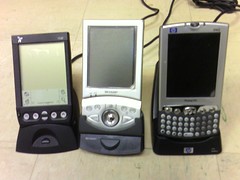
From 2000 to I think 2005, I was an avid PDA user. I went through three PDAs, shown here in a group photo:


Three PDAs in cradles

Ah, so many memories. The Visor on the left was my first PDA, a simple and well designed piece of equipment that I used with a fold-up keyboard to take field notes at Telecorp.

The Zaurus in the middle was an actual handheld PC running Linux; I quickly installed OpenZaurus so that I could perform various tricks, and I also ran Apache, MySQL, and PHP on it. Yes, that is ridiculous. The bottom part slid out to reveal a keyboard. Oh, it also took a CompactFlash card, so I acquired a CF wifi card and did a lot of surfing throughout the house.

The iPaq came at about the same time I switched my Linux laptop for a Macintosh. I had hoped that the iPaq's Windows Mobile operating system would provide a more stable and consistent runtime environment. Wifi was built in.

When the iPaq died, I faced the decision of what PDA to buy. At the top of my list was email and web browsing, which had become necessities. Fortunately, web services had really taken off by then, making SMS a de facto command line for many Internet services. So instead of a PDA, I bought a basic phone with high-speed internet capability. Here it is, two years ago.

My phone

It was much smaller and lighter than a PDA, and it allowed basic PDA-like functions. I could set calendar appointments and receive reminders via SMS. I could check email. I could do basic web surfing. I had a set of contacts, of course, which I would laboriously code into the phone. I could even look at (but not edit) my Google Docs and other services. In 2007 I began using Twitter and Facebook, mostly through the phone. In some ways that phone, with its relatively stripped-down interface, was like my beloved Visor. But without the fold-out keyboard accessory. And it began to really enhance my increasingly mobile lifestyle. I could catch up with email and tasks on the bus, for instance, or while walking across campus.

But as time wore on, phones began to incorporate other features such as GPS, and I realized that these other features were going to enhance mobility in significant ways. More on that in a future post.

Others have been comparing the G1 to the iPhone. I won't do that except peripherally. My comparisons will primarily be to my history of phones and PDAs. Look for these to come soon.

Tuesday, November 11, 2008

Reviews of the G1

As my Twitter stream shows, I acquired a T-Mobile G1 phone on Saturday. I'm still gathering my impressions, and will blog several mini-reviews over the next couple of weeks. Unlike other reviews, I won't spend a lot of time comparing it to the other devices I strongly considered -- the iPhone 3G and the Blackberry line of products -- but instead will discuss the progression that I took from PDAs to my previous phone to this one. As always, I'm thinking in terms of how this device will or will not support truly mobile work.

I was wrong about Jaiku

In the run-up to the T-Mobile G1 launch, I confidently predicted that the launch would coincide with the relaunch of Google's Jaiku service, which has been closed since Google acquired it. I noted how Jaiku could be the "killer app" for Android, providing location-based services with Twitter functionality and GMaps integration.

Well, here we are in the second week of November, and my prediction was wrong, wrong, wrong. Too bad. Google, get it together! Why don't you listen to me?

"Your business has accumulated a lot of stupid."

NotAnMBA has thoughts on how to take the opportunity of lean times to restructure your business. Less hierarchical, more networked.

GTD calendars

Stephen at HD BizBlog is selling the 2009 version of his DIY calendar along with other GTD collateral. Product description says:
This is a one-page-per-day DIY calendar page that is designed with the F-pattern for eye-tracking. This special design takes your natural eye movements into account, making it far more efficient for retrieving the important data that you have put into the calendar.
I'm still surprised at how flexible the GTD framework has turned out to be. David Allen advocates fairly simple tools - desk calendars, index cards - but in an era of cheap customization we see lots of entrepreneurs bringing their own expertise to bear on the framework to create supplemental tools. GTD is like the Twitter of productivity systems.

Thursday, November 06, 2008

Those Sarah Palin rumors

Ann Althouse has a thoughtful post on the reports you may have heard, the reports emanating from inside the McCain campaign regarding Sarah Palin's intellect and conduct. You may have heard them already: Palin thought Africa was a country rather than a continent. Palin appeared to McCain's aides in a bathrobe. Palin acted like a diva and didn't prepare for her interview with Katie Couric. Althouse is skeptical:
We don't know who's telling these stories, but obviously, there are many people with the motivation to blame others. Even assuming the stories are true, they don't have to be told. Why destroy Palin, a rising star in the Republican Party? Who wants her ruined? I'm not saying she doesn't deserve to be ruined. I want to know if the stories are true, and I want them in their most accurate form. (She thought Africa was a country? Really? Was this the slip of a tired, inattentive person, or someone who is clearly an ignoramus?) But I also want to know who wants us to know all these ugly things and why.
Right. Losing (and lost) campaigns tend to find scapegoats, partially because the aides want to avoid blame when they seek their next job, and partially because campaigns are an exercise in holding together fractious parties. The campaign is over, and now the Republican factions will enter a period of infighting among social conservatives, fiscal conservatives, small-government conservatives, neoconservatives, etc. as they renegotiate their coalition.

change.gov

I didn't know there was an Office of the President-Elect, but I am glad to see change.gov, which should give a window into the transition process for our new president.

I'm hoping more of the site becomes interactive as time goes on, though -- right now it's mostly brochureware. The "Agenda" section looks like it has been repurposed from the campaign website.

Tuesday, November 04, 2008

Juice

I've seen this Firefox extension pop up in a few places this morning, so when I got a chance, I installed it so I could take a look. Amazing.

You know how you're reading a story in your browser, you get interested in a particular phrase, and you get distracted as you Google for it, check Wikipedia about it, and so forth? Juice does all that research for you in a side pane. You highlight the phrase, drag it slightly to the right, and the rest of the work is done automatically. It might be enough to make me stick with Firefox as my primary browser even after Chrome for OSX comes out.

Monday, October 27, 2008

Rolling your own free, customized, free, multiplatform, and free qualitative data analysis tool. For free.

Qualitative data analysis tools are expensive. When I came to UT in 2001, I had the university spend $500 on one popular QDA tool, NVivo. It was going to change the way I did research. So I installed it, played around with it, was not impressed, and abandoned it.

Much more recently, I decided to try HyperResearch on the advice of a grad students from Education. Again, UT sprang for the $400 needed to buy it. I used it for two studies and again, I was not impressed: in some ways it was very limiting, particularly in terms of relating various types of data and coding. The interface was clunky.

And look: $900 spent for nothing.

But between those two times, I managed to analyze 89 sets of observations, 84 interviews, and assorted artifacts. This work followed me across three platforms (Linux, MacOSX, OpenZaurus), and it didn't involve an off-the-shelf qualitative research tool. I'm coming back to this solution for managing the data in my latest study, a study of collaboration and project management at high tech organizations. It offers better print formatting, more flexible data analysis, and multiple interfaces that can be chosen for the specific type of analysis or data entry. It's multiplatform. Fast. And it didn't cost me a dime.

So how do you save $400, $500, or even $900 on your next qualitative research project? It takes a little setup, but you can do it.

Needs
When you're analyzing qualitative data, you might have several different kinds of data. Here's the data types I regularly use:
  • Interviews (audio recordings and transcriptions)
  • Observations (transcribed field notes)
  • Artifacts (usually digital photos or paper that can be scanned; I have also recorded ambient noise at sites.)
You might also use other data, such as system logging.

In addition, you typically have administrative data such as information on participants (I include first and last name, pseudonym, and title at minimum).

For each of these data, qualitative analysis includes coding. You can code in several different ways, but let's keep it simple and think of coding as free-form tagging.

So how do you make sense of all this? Let's start with some don'ts:

Don'ts
Don't use Excel or other spreadsheets. Spreadsheets only offer two dimensions, and that means you're very limited in how you analyze the data. You'll end up doing one of the following:
  • Creating a spreadsheet for each datatype. So you'll have spreadsheets for observations, for interviews, etc. Since spreadsheets don't provide an intuitive or robust way to link data between spreadsheets, you'd have to do that connective work by hand.
  • Creating a single spreadsheet into which all data go. This will involve tremendous redundancy, with several fields going empty in every entry -- and lots of redundant data, since you'll have to tag name and date for every entry.
Don't try to manage all this outside of a table. Sure, you could dump your data in a big Word file and use comments for tagging, and sure, you could search text and comments. But you lose a lot of granularity that way, as well as the ability to gain a top-level view (e.g., how many times did I use this code vs. that code?).

Don't store your data online. Several free web-based services offer great solutions. But your data will not be secure. In many cases, you simply won't be allowed to store your data on an unencrypted server that isn't administered by the university.

So that's what you don't do. Now here's what I do.

Overview of My System
I use a MySQL database to store the data, with a different database table for each kind of data. The first table to set up is the Participant table, with each participant receiving a key index number. Other tables are all indexed by that participant number, so I can join tables based on participant.

Each table has a CODES field where I can insert codes from a list. I keep the list of codes in a text editor and surround each one with asterisks like this:
**COMPANY_HISTORY**
The asterisks allow me to search across a table and pick up just the codes -- searching for "**COMPANY" picks up codes that start with that string, while searching for "COMPANY" might pick up uses of the actual word in interview or observational notes.

To analyze the data, I use several MySQL front ends, including YourSQL, CocoaMySQL, and phpMySQL. These front ends are all free, they afford different views of the data, but they all work on the same underlying data. The result is far more flexibility than I would get from an off-the-shelf QDA tool.

Limitations
Obviously, this solution isn't for everyone:
  • You don't have to learn SQL, but learning just a little bit will make your life a lot easier.
  • You may have a hard time storing files in your SQL database, depending on your front end. I typically store them on the hard drive and store filenames and metadata in the database.
  • This method allows you to code by line, not by line portions or longer blocks.
How to Set it Up
The setup is not hard, but you'll need to be comfortable with uncertainty. Or get your system administrator to do it.

1. Download and install MySQL.
Go to mysql.com (or mysql.org) and download the free software. It has versions for several operating systems. The site also has a ton of documentation; keep a window open for installation.

2. Download one or more MySQL front ends.
Cruise on over to sourceforge.net and search for SQL. You should get a large list of SQL utilities and clients, some of which will be applicable, many of which won't be. I am using OSX, so I downloaded the following front ends:
  • YourSQL
  • CocoaMySQL
  • phpMySQL (this one runs on your internal web server, so it works across platforms, just like MySQL. It will take some additional setup.)
3. Create a database.
Follow your MySQL installation instructions to set a root user and password. (You can set different user and permission levels, but if you're the only one using the database, why bother?)

Once you do this, run your front end (or one of them, if you downloaded several) and follow instructions to connect to MySQL. Then create a database. I suggest naming it something descriptive -- not "research". For instance, I named the database for my current project "research-pm" -- the same name I used for my tags in GMail, GDocs, and Remember the Milk for the same project.

4. Create a table for participants. Create rows.
Now you create tables within the database. MySQL is a relational database, which means that you can relate the tables in different ways once you have them set up. I typically make the participants table the "handle" for most of the rest of the database, since most of my analysis focuses on what individuals do and say. So we create that one first.

So what do you need to know about your participants? I usually put in the following information:
  • pkey: a participants key. It's a unique integer that identifies the participant. When you refer to participants in other tables -- such as observational notes -- you can use that same number to designate the same participant in these other tables.
  • lname: Participant's last name.
  • fname: Participant's first name.
  • fname_p: Pseudonym.
  • position: text field for their job title (or similar information that might be relevant, such as profession).
  • site: If the study includes multiple sites, use either a text string or a number to indicate each.
  • Observation and interview dates: Depending on the data collected, you might or might not include these dates. Usually you can get these from querying the appropriate data tables.
Once you have roughed out the participant table, fill it out with information about each participant.

5. Create tables and rows for each kind of data you collect.
Each will be indexed to the participants table. For my current study, I created:
  • observations
  • interviews
  • interviewfiles
  • artifacts
  • site notes
For each of these, create at least the following:
  • key: The unique key for this piece of data. If it's from an observation, you might call this "okey," etc.
  • pkey: This field links the individual to her or his data. If a given observation was of participant 1, you'd put a 1 here.
  • date: The date you collected the data. If it's an observation, you might call it "obsdate," etc.
  • text: The data itself. For instance, if you're filling in observational notes, "obstext" would contain perhaps a paragraph from your notes. If it's an interview, "inttext" would contain an answer or paragraph from the transcribed interview.
  • codes: The codes you assign to this piece of data.
  • notes: Any additional information you might want to insert that doesn't fit into the fields above. Sometimes I use this to make notes about further investigation, artifacts I should collect, or methodological issues.
6. For each table, fill out rows.
You can do this manually via one of the front ends. You'll find that each front end has advantages and disadvantages in terms of data entry.

If you don't mind learning a little SQL, you can take your raw data (say, observational notes or transcribed interview notes) and insert the appropriate SQL around them with some search and replace commands. Once you do that, you can plug the whole mess in as a single query and it'll update the table with that data. That's what I do. It's much faster as long as you're willing to spend half an hour learning the appropriate SQL command (INSERT).

7. Code the table.
Now that the data are in the tables, code each table. In this scheme, that means filling the "codes" field for each row of each table. Codes can come from your starter codes, open coding, axial coding, or all three. I typically put them all in the same field; you could differentiate them or place them in different fields if you think you need that level of complexity.

Note: If you code thousands of lines of data with a code (say, **WORKPLACE**) and then decide you really need to rename this code (say, to **WORK**), you can do a search-and-replace with the "update" command. See documentation for details.

Similarly, you can do autocoding with an "update" command. For instance, suppose you want to make sure that each mention of "msword" in the field notes is coded with **SOFTWARE_OFFICE**. You can use "update" to search for those incidents and code them appropriately. Brute-force coding can be tricky -- you risk false positives and broad-brush characterization of the data -- but depending on your data, it can also be very useful and gain a lot of traction quickly.

How to Search
Now that you've entered and coded the data, you can do simple and complex searches.

1. Simple searches within tables
These are searches within one table. For instance, suppose you want to find a mention of msword in your observational notes just so you can look up the context. Or you want to see how many interview notes are coded with **SOFTWARE_OFFICE**. I usually use these two tools:

Search-as-you-type (YourSQL)
I love search-as-you-type. The idea is that as you start typing the string, the results reduce. Eventually you have zeroed in on the data you want, even before you're done typing.

The advantage is that you get the results quickly. The disadvantage is that this method searches across all fields, so you might get false positives. Suppose you're looking for "software" in the observational notes, but you catch all instances of **SOFTWARE_OFFICE** in the codes.

Search by string (CocoaMySQL)
This method allows you to specify the field and the relationship before you search. So you might set "obskey=1" to catch all observations of participant 1, or "codes like "%**SOFTWARE_%" to catch all observations where the codes field includes a code starting with "**SOFTWARE_".

The advantage is that the search is fine-grained and focuses on just one field. The disadvantages are that (a) it's not as fast as search-as-you-type and (b) you can't set up searches that look in more than one field.

But if you want to set up more complex searches that go across tables, you'll have to learn a little more SQL.

2. Complex searches joining tables
Since MySQL is relational, you can link these tables you've set up, and the result is a much more powerful set of queries.

Here's an example from the Telecorp study that became my second book. I had the following tables:
  • "workers"
  • "interviews"
Now suppose I want to grab all interview notes for Customer Service workers that are coded ***JOB_DESCRIPTION***", then append the workers' first names and pseudonyms to them so I can remember who they are. I ran this query so that I could see how the many different CS workers understood their jobs, especially so that I could zero in on differences in those understandings.

That's too complex for the simple queries earlier. So I ran the simple SQL query. The names after dots (ex: workers.fname) are field names in the given table.
select workers.wkey, workers.fname, workers.fname_p, interviews.notes, interviews.codes from workers, interviews where ((workers.area='Customer Service') and (workers.wkey=interviews.wkey) and (interviews.codes like '%**JOB_DESCRIPTION**%'))
So we can get really specific searches that join the different tables and allow us to slice the data in different ways. I could have added further codes beyond job description, searched across additional areas, specified a date, etc. In fact, I did do all of these, and I occasionally joined three tables to yield really interesting connections among the different types of data.

Formulating these can be a pain, so I formulate them once, make sure they work, then save them. If I want to run it again with a different code, I copy and paste.

How to Print
One big problem with HyperResearch is that it does an appalling job printing data. In the system I've described, you could print in a number of ways. The best two are:
  • Use phpMySQL to generate the table you want, then print from the browser.
  • Use MySQL from the command line to dump the query into an HTML file.
As always, see the documentation.

Conclusion
So that's a lot to absorb, and I would have to write an entire tutorial to give you a more detailed idea of how to implement this system. Since I'm sort of busy with research, I won't do that. But don't hesitate to comment with specific questions.